EN-1 Wired Entryway Sensor LED Patterns
Last updated: August 10, 2026
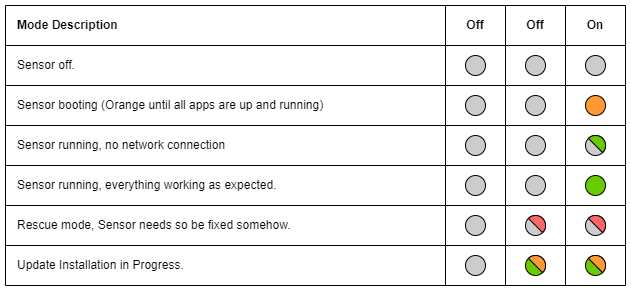
- Left "Off" Column: This column shows the LED state when it has been manually configured to remain off at all times, regardless of the sensor's status.
- Note: This setting is not enabled by default.
- Middle "Off" Column: This column shows the LED state when it has been manually configured to only activate under specific conditions, such as during rescue mode or when a firmware update is in progress.
- Note: This setting is not enabled by default.
- Right "On" Column: This column shows the default LED behavior, displaying different colors and patterns based on the sensor’s current state.