VergeSense Metrics & Definitions
Last updated: August 10, 2026
Overview
To better understand some definitions, here are common terms you will see throughout this article:
Space: Generally, we use "Space" to refer to any entity (single space, a group of spaces via Space Type or Space Group, floor, building, or the entire portfolio) you may be analyzing.
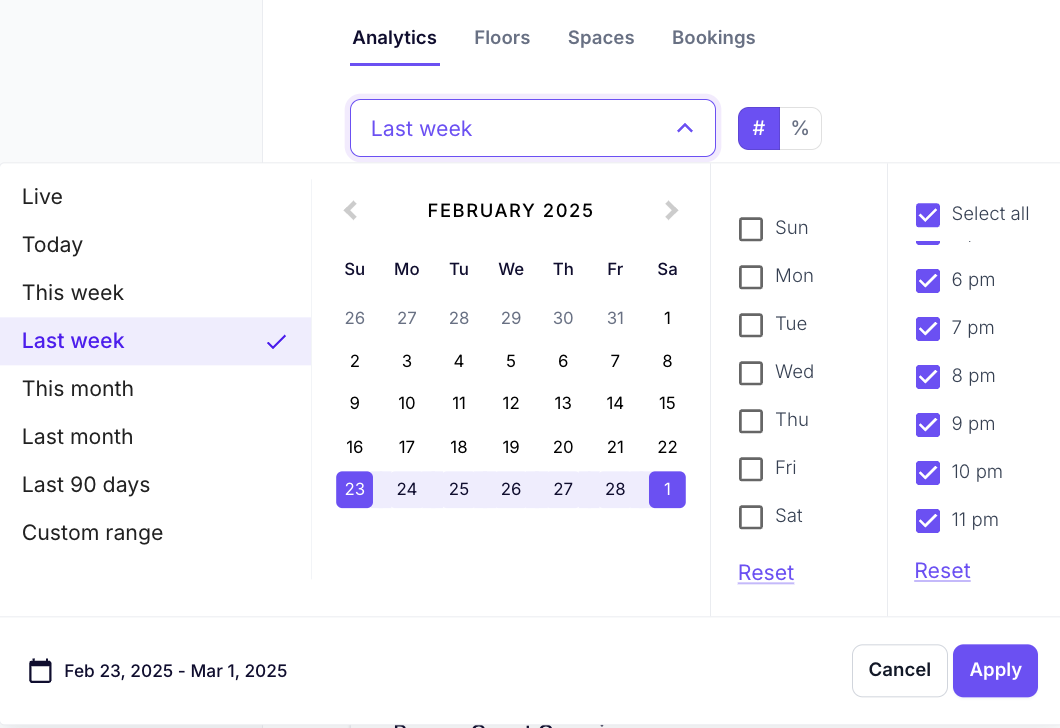
Working Hours: The days and hours (e.g. Monday - Friday, 8-5) set Globally or customized to the Building in Settings. This is used as the default in all analytics and reports. Specific (or all) days and hours can be selected and applied in the Time Selector.
Person Count
Person Count metrics can come from your VergeSense Area or Entryway sensors or Wi-Fi data sources. Entryway counts are denoted by "Entryway Service", while Wi-Fi is denoted by "Wi-Fi Service".
If a building or floor has a mix of sensors and data sources, the priority order is VergeSense Entryway service, VergeSense Wi-Fi service, VergeSense area sensors (sum of all the spaces). Please note, Entryway services can apply to each floor and/or the building as whole. It is possible that you may see Entryway Service for the person counts on the Building level and not the floor. Please contact your Customer Success Manager with any questions.
For floors with only area sensors, users will see a person count that sums the person counts for all the spaces on the floor, and generally indicates that we are not able to provide a "true" floor level person count. VergeSense recommends utilizing Wi-Fi or Entryway for floor (and building) level person counts for more robust floor person count analytics.
| Metric | Definition | Where is it available? | How should I use it? |
| Average Person Count | The average number of people detected within all selected spaces during working hours (unless other hours are selected by the user) within the selected timeframe. | * Visualizations and Data tables (Buildings, Floors, and Spaces) throughout the platform * By Day/Hour/30 min/15 min exports when using Export Data * When calculating Average Capacity Usage | Understand average usage - especially helpful when comparing to peak and average daily peak. |
| Average Person Count When Used | The average number of people detected within all selected spaces during working hours (unless other hours are selected by the user) within the selected timeframe, excluding times of no use (person count = 0). | * Visualizations and Data tables (Buildings, Floors, and Spaces) throughout the platform * By Day/Hour/30 min/15 min exports when using Export Data * When calculating Average Capacity Usage When Used | To answer: * When this space is being used, on average how many people are using it? * Is it being used as designed, do I need to dive deeper or redesign? |
| Peak Person Count | The maximum number of people detected during the selected timeframe. Learn more about how we calculate peak for groups of spaces in Metric Definition: Peak Person Count | * Visualizations and Data tables (Buildings, Floors, and Spaces) throughout the platform * By Day/Hour/30 min/15 min exports when using Export Data * When calculating Peak Capacity Usage | Identify and evaluate outlier events or anomalies |
| Average Daily Peak [Person Count] | The sum of each day's peak in the timeframe selected, divided by the number of days in the timeframe selected. Note: the Average Daily Peak for a single day is the same as the Peak for that day. | * Building Insights * Person Count Over Time visualization | Average daily peak gives users a better understanding of “typical peaks”, softening outliers and allowing for a more complete picture of how spaces are being used |
Capacity Usage
| Metric | Definition | Where is it available? | How should I use it? |
| Average Capacity Usage | The average number of people detected within all selected spaces during working hours (unless other hours are selected by the user) within the selected timeframe, divided by the summed capacity of the spaces. | * Visualizations and Data tables (Buildings, Floors, and Spaces) throughout the platform * By Day/Hour/30 min/15 min exports when using Export Data * Floor Heatmap * Floor Usage Map | Understanding space usage and to answer: On average, how are my spaces being used relative to their capacity? |
| Average Capacity Usage When Used | The average number of people detected within all selected spaces during working hours (unless other hours are selected by the user) within the selected timeframe, excluding times of no use (person count = 0), divided by the summed capacity of the selected spaces. | * Visualizations and Data tables (Buildings, Floors, and Spaces) throughout the platform * By Day/Hour/30 min/15 min exports when using Export Data | When this space is being used, how many people are using it : * Compared to its size * Compared to how I expect it to be used |
| Peak Capacity Usage | The maximum number of people detected during the selected timeframe, divided by the summed capacity of the selected spaces. Learn more about how we calculate peak for groups of spaces in Metric Definition: Peak Person Count | * Visualizations and Data tables (Buildings, Floors, and Spaces) throughout the platform * By Day/Hour/30 min/15 min exports when using Export Data * Floor Usage Map | To help answer: * When this space is being used by the most people, how many people are using it? * How can I ensure that the space is used to accommodate average capacity usage, average daily capacity usage, and peak capacity usage? * Are there other spaces that could better accommodate peak capacity use? |
| Average Daily Peak [Capacity Usage] | The average of each day's peak in the timeframe selected over the capacity of the selected spaces, divided by the number of days in the time period. Note: the Average Daily Peak for a single day is the same as the Peak for that day. | * Building Insights * Person Count Over Time visualization | Average daily peak gives users a better understanding of “typical peaks”, softening outliers and allowing for a more complete picture of how spaces are being used |
Time Usage
| Metric | Definition | Where is it available? | How should I use it? |
| Time Usage | The total amount of time VergeSense detected either a person or a coat, bag, or laptop in a space. | * Floor Usage Map * Data tables, including by day/hour/30 min/15 min in Export Data * Comparisons Reports | To understand: * What's the total amount of time that this space is in use? |
| Active Time Usage | The amount of time VergeSense detected a person in a space. If a %, this is out of time available. | * Floor Usage Map * Data tables, including by day/hour/30 min/15 min in Export Data * Comparisons Reports | * What's the total amount of time that this space is in use by people? |
| Passive Time Usage | The amount of time VergeSense detected a coat, bag, or laptop in a space. If a %, this is out of time available. Note: Not all sensors can capture passive usage. Contact your CSM if you are not sure if a space should have passive time usage. | * Floor Usage Map * Data tables, including by day/hour/30 min/15 min in Export Data * Comparisons Reports | * What's the total amount of time that this space is perceived as unavailable because of "things" left in the space? * Should I implement a "clean desk" policy? |
| Time Available | The time a space is available for use based on Working Hours or custom time selected | * When calculating total, active, or passive Time Usage |
Space Usage
| Metric | Definition | Where is it available? | How should I use it? |
| Used | A space is "used" if there was 15 minutes or more of active time usage in an hour. Spaces are defined as used at the same time if each space was used within same hour. Note: Currently, simultaneous usage does not require the 15 minutes of active time usage occur concurrently, it must only occur in the same hour. | * Space Usage Timeline * Space Type and Space Group Comparisons Reports | View the Space Usage timeline by hour to understand: * How many spaces in this space type or space group are used throughout the hour/day? |
| Shortage Event | Any hour where 80% or more of the spaces in a Space Type or Space Group were used. Note: This can be aggregated to the day, week, or month. If the Space Usage timeline is not hourly (time selected > 7 days), the Space Usage timeline hoverstate will tell you the total number of Shortage Events in that day/week/month. | * Space Usage Timeline * Space Type and Space Group Comparisons Reports | * What space types or groups experience the most shortage events? |
Bookings
To learn more about booking metrics, view Booking Insights
Live
To learn more about our live metrics, view Live Views